



Illusionist
Another RISCWorld exclusive...
Introduction
What is Illusionist?
Illusionist is a powerful 3-dimensional graphics package. It allows the user to create wire frame (vector) images, built up by adding together a series of objects, both pre-defined and user defined.
3D computer graphics can be directly associated with the techniques of photography. A photographer finds or creates his scene, puts his camera in the desired position and angle, providing or waiting for the appropriate lighting, then he focuses that light on film.
Computers mimic that process to make synthetic images. The key parts of the process are defining, arranging and illuminating a set of objects, and converting this three dimensional scene to a two dimensional viewing device - the monitor. The difference is that all of these steps take place entirely in a computer.
Instead of using objects, lights and cameras, the rendering process works on an internal representation of an imaginary scene. The passage of light through the scene, its interaction with surfaces and its projection onto the screen are simulated by algorithms that operate on this internal representation.
What illusionist does
Illusionist is a package that enables you to create any object, of any colour and texture, illuminate it with coloured lights or spot lights, and render it in any 256 colour screen mode. A special colour mixing algorithm enables Illusionist to display an infinite number of colours, giving the impression of very expensive graphics hardware.
The difference between Illusionist and Render Bender
Render Bender uses ray tracing to generate the image. This form of rendering produces very realistic images, with shadows and reflections, but it is also very time consuming Rendering time increases as more polygons are added.
Illusionist uses a more traditional technique of painting the polygons on the screen one at a time. You cannot cast shadows or have mirrored objects, but you can design and render far more complex scenes in a fraction of the time taken to ray trace them.
Once the vector image is created you can then take any sprite or picture file and map it onto any object. In the case of a sphere you can literally wrap it around the sphere. The objects can then be given a texture or surface, varying from matt to metallic.
By adding light sources, different areas of the picture can be highlighted and of course all surface textures are taken into account when the rendering process begins.
The beauty of the package is that because each object is created separately any object in a picture can be moved, rotated or enlarged independently of any other object on screen, thus opening the doors to animation and graphics manipulation. Illusionist also makes use of the Serial Port's Graphics Enhancer card if it is fitted to your computer. This provides better graduated shading in many cases and enhances the image quality.
What can I use Illusionist for ?
Illusionist can be used for a variety of projects. You can construct room scenes, pack designs, snooker table, robots, logos, chess sets and, dare we say, optical illusions such as those produced by Escher. Don't forget that the images produced are also artistic and art is a very valid use for Illusionist. The uses are unlimited - the only limit is your imagination !
Useful additions
Because Illusionist can accept sprites for mapping onto objects it is useful to have a library of images that can be used for this purpose. You can have a pre- defined library or you can create your own. This can be done in many ways. You can use painting packages such as Paint or Artisan - save the screens as sprites not as compacted files. All maps must be either mode 12 or mode 13.
Perhaps the most useful addition would be a scanner. This enables you to scan pictures, photographs etc for use as texture maps, but more importantly you can add to the library of real texture maps that are supplied with Illusionist. The supplied maps include wood, marble, brick etc. You can scan almost anything and use it as a texture map. For example, sandpaper, chocolate wrappers, sandstone, wallpaper etc.
Colour scanners are best for this work and of course Clares do supply a high quality colour scanner, telephone for details and prices,
Object definition
All objects in a scene are created with flat surfaces (polygons). Using a cube as an example (Figure 1), we have 8 points that are connected to make 6 polygons. After positioning the points in 3D, the top (shaded) 4 sided polygon is created by connecting the points numbered 1,4,8,5. Note that the polygon is created in an anti-clockwise direction, this makes the surface face upwards. Unless otherwise specified, all polygons facing away from the 'observer' are invisible. All the faces of a cube should be facing outward and thus visible, or at least visible if the cube is rotated.
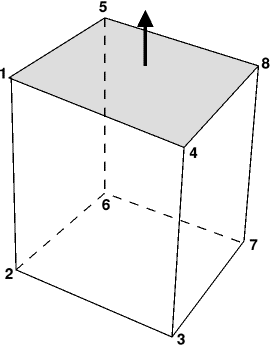
A polygon is a closed figure created from three or more straight sides. Specific forms of polygon are named relative to the number of sides making up the polygon eg triangle, pentagon etc.
In Illusionist these polygons are normally single faced. This means that if you view them from one side they are visible but from the other side they are invisible. Normally polygons are drawn facing you so that they are visible. However, you can rotate the polygons and in some instances part or all of the polygon may disappear. In this case you may need to use the option to make polygons double faced so that they are always visible.
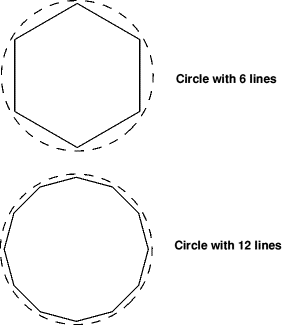
Curved surfaces must be approximated by using a number of small polygons. The more polygons you use, the smoother the object will be. In Figure 2 the difference between using 6 and 12 lines to form a circle is shown clearly. Instead of using lines in 2 dimensions Illusionist uses polygons in 3 dimensions.
In the case of 'closed' objects such as the cube, pyramid, sphere and torus the polygons face outward. So that if you rotate the object it is always visible as there is always at least one polygon facing you. Other objects such as tube, hemisphere, surface etc have no closed ends so if you rotate the object such that you are looking at the inside of some of the polygons then these polygons are not visible unless they have been made double faced. What shows on screen is an object that, in the case of the tube, appears to be only half a tube. If you change to double faced then it looks like a whole tube because the back polygons are now visible.
Entering the points and polygons of often used objects like spheres would be very time consuming, so Illusionist has a menu of objects that can be created instantly. These include cubes, spheres, cones, and tubes. The smoothness of the curved objects can be altered by altering the number of object sides used. This is done using the Misc.Object sides menu and the default is 10 sides.
Hint: Do not think of objects as cubes, pyramids, tubes etc but as a series of polygons that are joined together to form these shapes.
RISCWorld